
Date:      Sun, 4 Jan 2015 12:40:46 -0500
From:      Xavier Freebsd Questio <xavierfreebsdquestio@aim.com>
To:        freebsd-questions@freebsd.org
Subject:   Re: emulate a Xorg configuration of GNU/Linux (Fedora 21) on FreeBSD
Message-ID:  <8D1F65CB4E03AE5-15D0-B0B5@webmail-vm170.sysops.aol.com>
In-Reply-To: <20150104180240.6c6cf30b.freebsd@edvax.de>
References:  <8D1F641A1D2B4CB-15D0-A6C2@webmail-vm170.sysops.aol.com> <20150104153549.70c269ae.freebsd@edvax.de> <8D1F6518B6F7572-15D0-ABA6@webmail-vm170.sysops.aol.com> <20150104180240.6c6cf30b.freebsd@edvax.de>
next in thread | previous in thread | raw e-mail | index | archive | help
On Sun, Jan 04, 2015 at 06:02:40PM +0100, Polytropon wrote:


Hi Polytropon ,


> On Sun, 4 Jan 2015 11:20:52 -0500, Xavier Freebsd Questio via

freebsd-questions wrote:

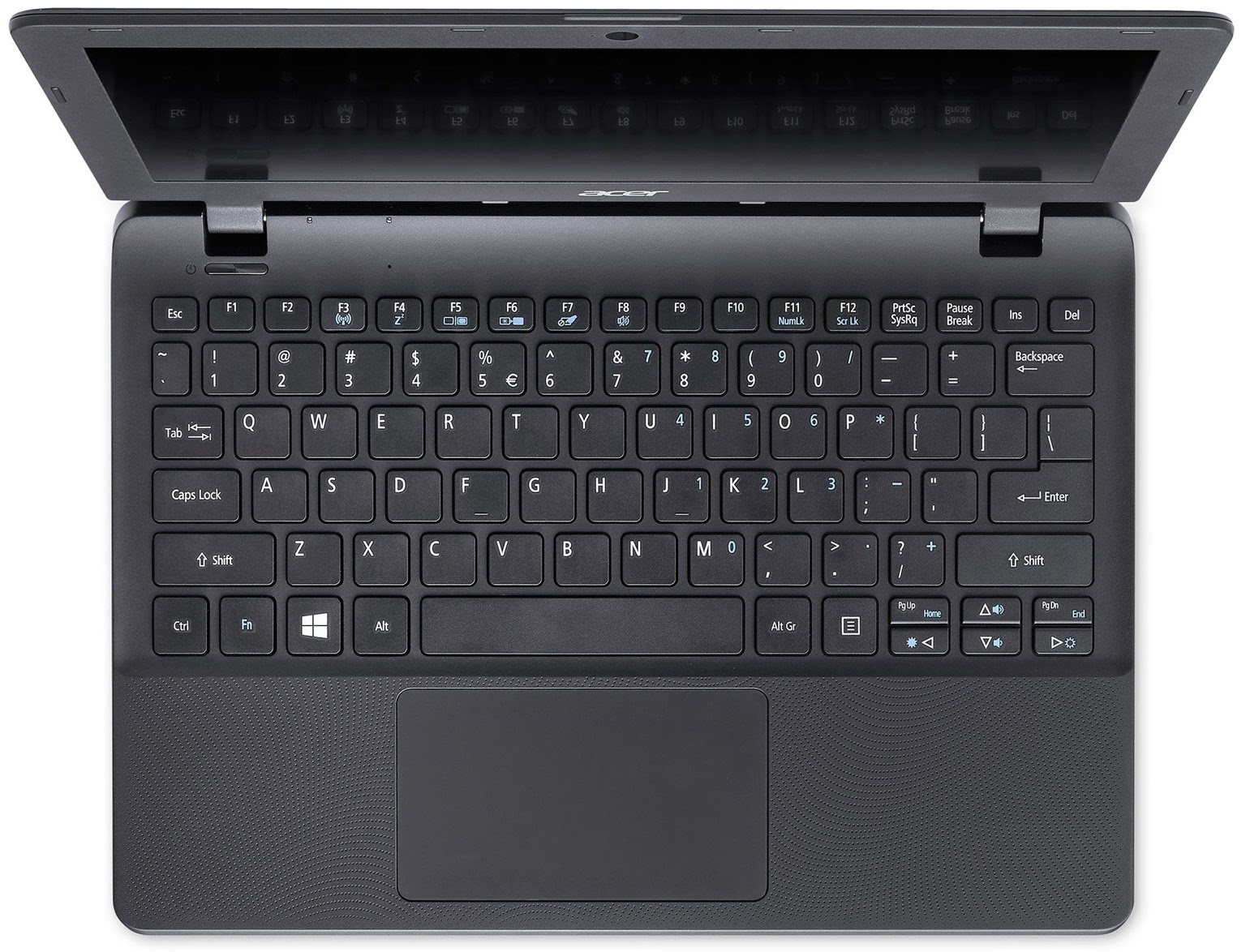
> > I have this keyboard:

> >

> > http://tinyurl.com/ltjj2a2

>

> This one?

>

>

http://4.bp.blogspot.com/-XJlzFI79lWQ/VFHSMP0KOsI/AAAAAAAAJOc/dVyuwlnbcMs/s1600/ES1_3.jpg

>


Yes, it is.


>

>

> > Your refer to "Fn" F5 and F6 keys ?

>

> Correct.

>


Ok. I too.


>

>

> > I try it and don't get output for

> > VGA external connector when I plugin it in HDMI input connector of

TV.

>

> Ah! That could be the problem!

>


Yes.


> HDMI isn't capable of mapping _all_ imaginable DVI (or VGA)

> outputs generated by a computer. This usually shows that you

> can use a TV as a computer monitor in many cases, but not

> in all cases. This might be such a case. A common problem

> seems to be that HDMI probably doesn't transmit the DDC

> information properly, so the external screen isn't detected

> correctly, and therefore all the autodetect magic fails.

>

> Another problem could be that those keys don't work, or to

> be precise: They require a proprietary driver to work, which

> means that their function is not "in the laptop", but "in

> the vendor-supplied software", which is bad.

>


Curiously, with many GNU/Linux flavours, for example, Fedora 21; it get

out the image of desktop by default settings to HDMI of TV.


>

>

> > My actual /etc/X11/xorg.conf is:

> >

> > http://pastebin.com/ji5QgvE6

>

> The significant parts are:

>

> Section "Device"

>         Identifier  "Card1"

>         Driver      "vesa"

>         BusID       "PCI:0:2:0"

> EndSection

>

> Maybe you cannot use VESA together with the limited range

> of valid HDMI resolutions...

>


It is default FreeBSD Xorg configuration generator.


>

>

> > Any idea ?

>

> First, try to load X with the correct driver for the

> video "card" in your system. Then you can go ahead and

> fine-tune xorg.conf with the _actual_ configuration

> data of the TV screen: size (inches or centimeters),

> pixels (the _real_ number of them), DPI and so on.

> You can define the settings for the mode it supports.

> Probably you have to review the technical parameters

> in the manual.

>

> You could use the following sections as templates:

>

> # snippet from /etc/X11/xorg.conf

>

> Section "Monitor"

> 	Identifier	"Monitor0"

> 	VendorName	"Eizo"

> 	ModelName	"FlexScan F980"

> 	HorizSync	30.0 - 137.0

> 	VertRefresh	50.0 - 160.0

> 	Option		"DPMS"			"false"

> 	DisplaySize	410 305

> EndSection

>

> Section "Device"

> 	Identifier	"Card0"

> 	Driver		"nvidia"

> 	VendorName	"nVidia Corporation"

> 	BoardName	"G73 [GeForce 7600 GS]"

> 	BusID		"PCI:2:0:0"

> 	Screen		0

> 	Option		"NvAGP"			"3"

> 	Option		"UseEdid"		"FALSE"

> 	Option		"UseEdidDpi"		"FALSE"

> 	Option		"DPI"			"96 x 96"

> EndSection

>

> Section "Screen"

> 	Identifier	"Screen0"

> 	Device		"Card0"

> 	Monitor		"Monitor0"

> 	DefaultDepth	24

> 	SubSection "Display"

> 		Viewport	0 0

> 		Depth		24

> 		Visual		"TrueColor"

> 		Modes		"1400x1050" "1152x864" "1024x768" "800x600" "640x480"

"320x240"

> 	EndSubSection

> EndSection

>

> # end of file snippet


The problem is: I have an Intel video card, not NVIDIA ...


My question is, if with GNU/Linux it show by default configuration,

isn't possible in FreeBSD ?


>

> You can see some simplification here.

>

> Please note that this example is from my home computer

> which uses a CRT, so there is no "the one" screen size

> and no fixed DPI value. :-)

>


Ok.


Ideas ?


Thanks.
Want to link to this message? Use this URL: <https://mail-archive.FreeBSD.org/cgi/mid.cgi?8D1F65CB4E03AE5-15D0-B0B5>